Query Library
Save queries for reuse and sharing with your team
The Query Library is a shared collection of queries available to all users of your Berserk instance. Queries are organized into folders and stored in Postgres, optionally mirrored to a Git repository for version control and collaboration.
Planned Feature
All library queries are currently visible to every user on the instance. Per-user private queries are planned.
Using the Library
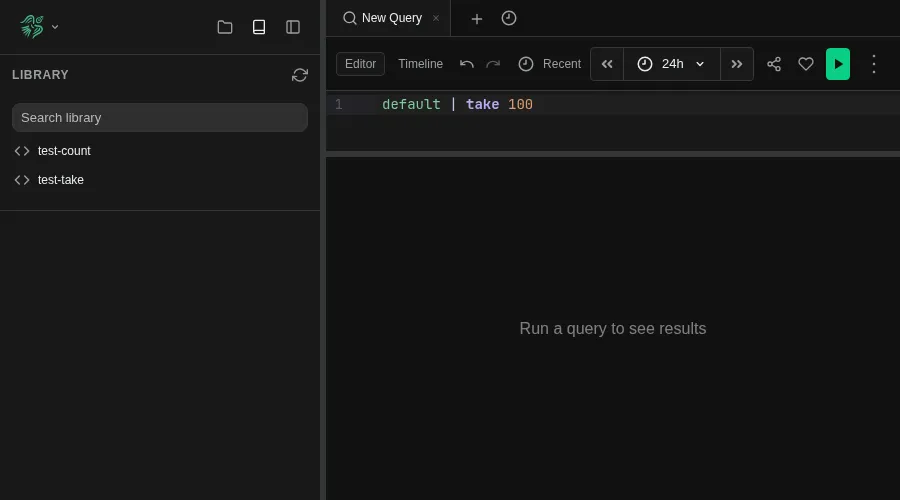
The Library panel is accessible from the sidebar (book icon) or the toolbar tab. From there you can:
- Browse queries organized in folders
- Search by name or query text
- Select a query to open it in a new Explore tab
- Save the current query to the library using the save button in the editor toolbar, optionally adding a description
- Delete queries you no longer need
Each saved query carries a name, the query text, a default time range, and an optional free-text description shown on hover in the Library panel.
Git Sync
Postgres is the source of truth for the library. When a Git repository is configured, the library table is mirrored to Git in both directions: changes made in the UI are committed and pushed automatically, and changes pushed to Git from any source — CI pipelines, editors, scripts — are reconciled back into the database on the next sync cycle.
For setup and deployment, see Git Sync Configuration.
How It Works
The database is canonical; the Git working tree is a synchronized mirror. The directory structure of the exported YAML files mirrors the folder hierarchy you see in the UI.
File Format
Each query is exported as a single YAML file:
# library/queries/charts/time-series.yaml
query: |
  default | summarize count() by bin_auto(timestamp)
since: "24h ago"
until: "now"
description: Requests over time, binned automatically
database: default
description and database are optional and omitted when empty, so files written by older versions (without them) still load. database pins the query to a database by name (portable across clusters); when the query is opened it resolves to that database, and default and other tables resolve against it. An unknown name falls back to the user's current database.
Sync Loop
On a configurable interval (default 30 minutes), and immediately after a UI mutation, the sync loop:
- Fetch the remote branch.
- Reconcile remote changes into the database (last-write-wins; see below).
- Export the live table to the working tree (writing changed files, removing deleted ones).
- Commit the export on top of the freshly-fetched remote tip and push — always a fast-forward.
On the first run after startup, the entire repository (and any local seed files) is imported into the database.
Conflict Resolution
Conflicts on the same query are resolved last-write-wins, comparing the remote Git commit time against the database row's last-update time. The newer write wins; the other side is overwritten on the next export. Deletions participate too (via tombstones), so a delete on either side can win or lose by the same rule.
Because each cycle rebuilds its commit on top of the latest remote tip, pushes never hit merge conflicts. If a concurrent push from elsewhere rejects ours (non-fast-forward), the next cycle fetches that commit, reconciles it into the database (last-write-wins), and re-exports — so it converges without losing the remote change. Last-write-wins is enforced atomically in the database (a conditional update keyed on the last-update time), so a newer UI edit is never clobbered by an older remote one even under concurrent writes.
Last-write-wins uses each side's own clock. With multiple writers, a query edited on two sides within the same window keeps only the later write — non-conflicting edits to different queries always survive.
Directory Layout
The folder structure in Git mirrors the folder hierarchy in the UI:
library/
├── queries/
│   ├── logs/
│   │   ├── json/
│   │   │   ├── bunyan.yaml
│   │   │   └── pino.yaml
│   │   └── syslog.yaml
│   └── charts/
│       ├── time-series.yaml
│       └── barchart/
│           └── service-count.yaml
A file at queries/logs/json/bunyan.yaml appears in the UI under logs > json > bunyan.
Co-locating Queries with Source Code
Git Sync lets you keep your Berserk queries alongside your application source code in the same repository. This makes it easy to keep your log statements in code synced with the queries you use to find them in Berserk.
# Clone the library repo
git clone git@github.com:your-org/berserk-library.git
cd berserk-library

# Add a new query
mkdir -p queries/alerts
cat > queries/alerts/high-error-rate.yaml << 'EOF'
query: |
  default
  | where severity_number >= 17
  | summarize error_count = count() by service = tostring(resource["service.name"]), bin(timestamp, 5m)
  | where error_count > 100
since: "1h ago"
until: "now"
EOF

# Commit and push
git add .
git commit -m "Add high error rate alert query"
git push
The UI picks up the change within the configured polling interval.
Sync Status
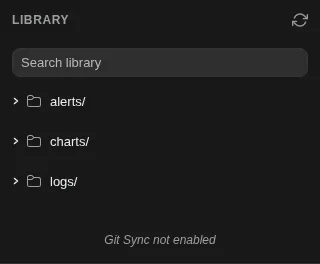
The Library panel shows a sync status indicator:
| Indicator | Meaning |
|---|---|
| "Git Sync not enabled" | No Git mirror configured — the library lives only in Postgres |
| Green | Synced with remote |
| Orange | Local commits pending push |
| Red | Sync error (hover for details) |